Why inventory records matter
A stack of cards tells you what is physically present. It does not tell you which cards are already listed, what you paid for each one, or whether a completed sale left a profit. Records connect those facts and help you investigate missing costs or mismatched sales.
What to track for each card
- Identity: a unique inventory ID or SKU, player, year, set, card number, variation, and condition or grade.
- Acquisition: purchase date, source, purchase cost, receipt reference, and any lot-allocation notes.
- Location: where the card is stored so you can find it when it sells.
- Listing: status, marketplace, listing reference, and asking price.
- Sale: sold date, sale price, selling fees, outbound shipping, other transaction expenses, and any refund or return.
This is a recommended recordkeeping checklist, not a claim that every field is automated in ProfitWire. Start with a manageable set of fields and keep them consistent.
Track singles and bulk lots differently
For individually listed cards, a unique ID keeps similar copies from being confused. Two cards with the same player and set may have different condition, purchase cost, and storage locations.
For a bulk lot sold as one unit, record the lot’s quantity and total cost. If you split the lot into singles, link each new record back to the original purchase and allocate the cost. Read how to track sports card cost basis for equal and weighted allocation examples.
A practical purchase-to-sale workflow
Follow one card through the business
- Receive: assign SKU CARD-001. Record a $40 acquisition cost and the purchase date; save the receipt.
- Store: record its box or row location in your records.
- List: mark it listed on eBay and save the listing reference with the same SKU.
- Sell: record an $80 sale, $10 in fees, and $5 in shipping and supplies.
- Reconcile: check the marketplace records and confirm $80 − $40 − $10 − $5 = $25 before other expenses or adjustments.
- Close: mark the item sold, retain the linked records, and handle any later refund or return against that sale.
These are illustrative records, not customer results or a standard eBay fee schedule.
Spreadsheets: useful, with limits
A spreadsheet is a reasonable starting point. It is flexible, easy to sort, and lets you design your own columns. One row per item and a consistent SKU can support a clear workflow.
The challenge is maintaining it. Copying marketplace records, entering fees, matching sales to purchases, and fixing broken formulas all depend on your process. A well-maintained spreadsheet can work; switching tools does not correct inaccurate source records by itself.
How software can simplify reconciliation
ProfitWire brings inventory, cost basis, sales, fees, shipping, and expenses into one workflow. It supports manual recordkeeping for sellers and automated eBay synchronization for paid Seller and Pro plans. Other marketplaces should not be assumed to have automated imports.
For sellers using Card Dealer Pro, ProfitWire matches those eBay listings and sales back to inventory by SKU. Consistent identifiers still matter: they connect the card you bought with the card you sold.
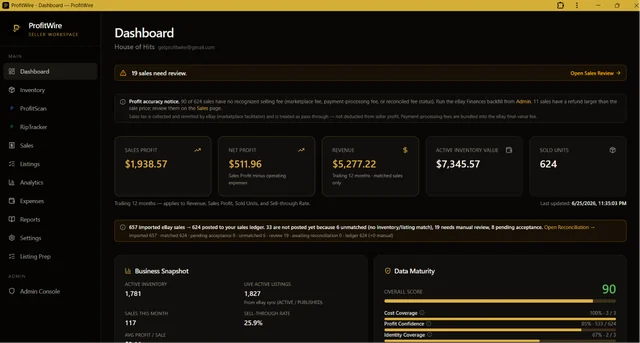
Review exceptions, not just totals
Regularly look for cards with missing purchase cost, sales without an inventory match, listed cards you no longer hold, and expenses recorded twice. Correct the underlying record before trusting the total.
To check one sale’s economics, use the free sports card profit calculator. For the ongoing business, keep source records and reconcile them consistently.